
Simmer
Tame power-hungry apps when your laptop runs on battery.
What it looks like
What it does
Battery first
- Tames apps only on battery — or always, your choice
- Optional charge-level threshold
- Pauses when you are idle
Per-app rules
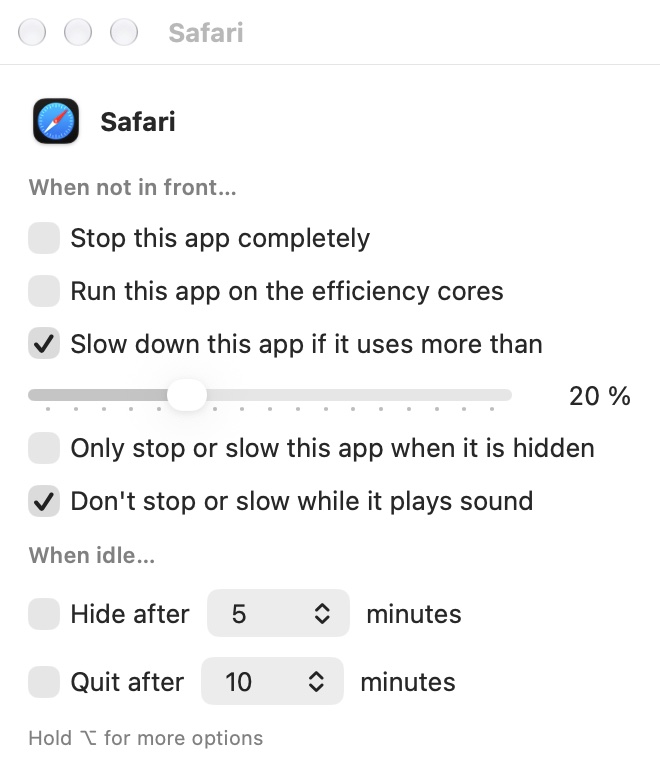
- Efficiency cores when in background
- CPU limit from 1 % up to 500 %
- Stop completely while in background
- Hide or quit after N minutes idle
Smart protection
- Never touches essential system processes
- Leaves apps alone while they play audio or download
- Wakes an app the moment you bring it to front
Menu bar
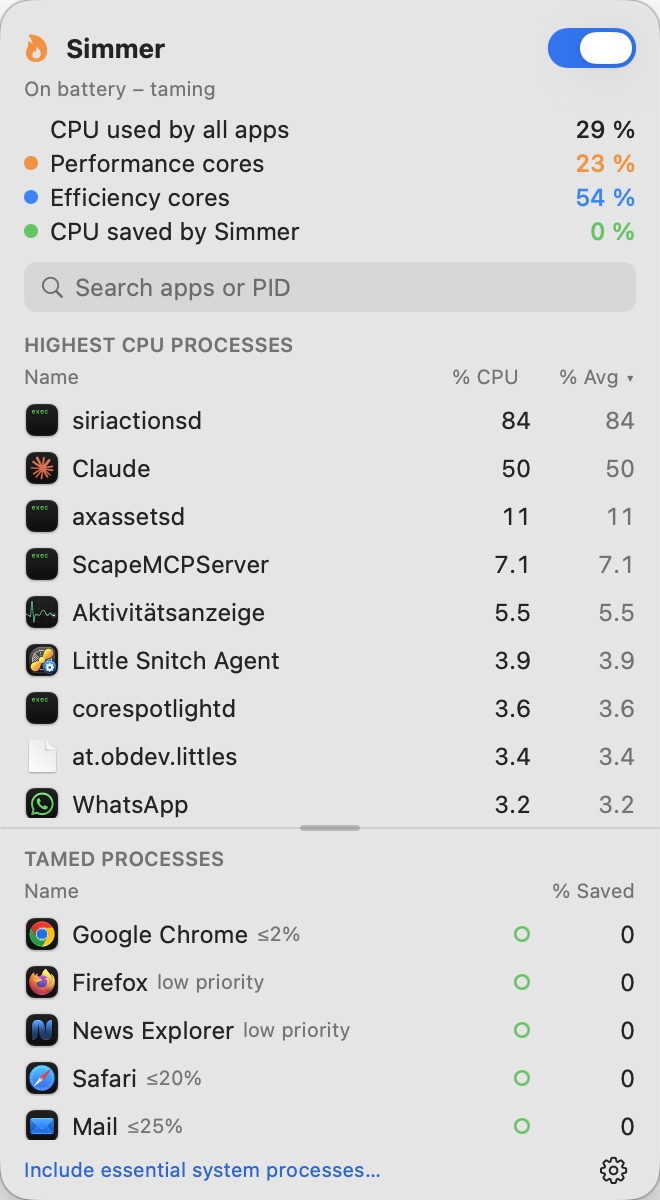
- Flame icon with live CPU usage
- Performance and efficiency core load
- Panel with top processes and tamed apps
Alerts
- Notification when an app burns CPU for too long
- Limit it with one click
Two editions
- Simmer Lite in the App Store: efficiency cores only
- Simmer (download): full control with a small helper
Two editions
| Simmer (download) | Simmer Lite (App Store) | |
|---|---|---|
| Efficiency cores in background | ✓ | ✓ |
| CPU limit 1–500 % | ✓ | — |
| Stop apps in background | ✓ | — |
| Hide or quit when idle | ✓ | — |
| System processes (Spotlight, backups …) | ✓ with helper | — |
| Faster Time Machine backups | ✓ with helper | — |
The App Store only allows sandboxed apps, and the sandbox forbids pausing or limiting other apps. Simmer Lite does what the sandbox allows; the download edition does everything.
Install
- Download
Simmer-x.y.z.zipfrom the latest release and unzip it. - Move
Simmer.appto your Applications folder and open it. The app is signed and notarized by Apple, so it opens without warnings. - Optional: install the helper in Settings → General and approve it once in System Settings → General → Login Items. Without it Simmer controls only your own apps.
Do not run Simmer together with another app tamer — both would fight over the same apps.
Permissions
| Feature | Permission |
|---|---|
| Control system processes (full edition) | Helper — approve once in System Settings → General → Login Items |
| High-CPU alerts | Notifications |
Every permission is requested only when the matching feature is used for the first time.
Privacy
No accounts, no tracking, no analytics, no third-party SDKs and no network access at all. Simmer reads process names and CPU times on your computer and keeps your rules in its own settings. Nothing leaves your computer.
Read the full privacy policy →
Support
Questions, bug reports and ideas belong in the issue tracker — that is the fastest way to reach the developer: